A useful way through
- Identify the exact edit and audience. Keep a version name, duration and the purpose of the video with the caption file. A transcript can help prepare the words, but timed captions must match the finished sequence. An edit change can invalidate previously correct timings.
- Create cues from the actual audio. Include the speech and meaningful non-speech information needed to understand the sequence; identify a speaker when that is necessary. W3C distinguishes these captions from dialogue-only subtitles. Do not invent an unheard sound or a speaker’s identity.
- Review the rendered video with captions enabled. Check synchronisation, reading order, names and whether text covers important content. Also listen to the audio and compare it against the cue sheet. Automatic text is a draft to inspect, not an approval record.
- Record corrections against the exact edit, then review the changed export. Keep a separate transcript where it serves the audience, and plan other needed access features independently. A caption pass alone does not establish that the whole page or film meets every accessibility requirement.
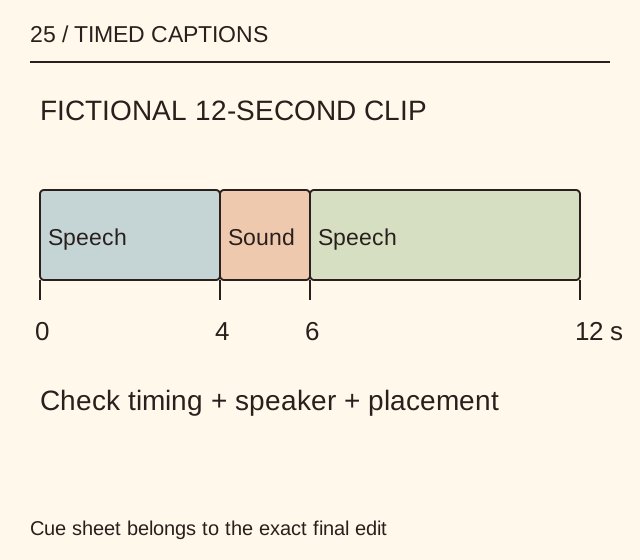
Read the map as text
25 / TIMED CAPTIONS · FICTIONAL 12-SECOND CLIP · Speech · Sound · Speech · 0 · 4 · 6 · 12 s · Check timing + speaker + placement · Cue sheet belongs to the exact final edit
- Edit
- Cue 1
- Cue 2
- Review
Put it into practice
In a fictional twelve-second clip, the first cue identifies a speaker introducing a workshop; the second includes a doorbell that interrupts the conversation. A third cue resumes the speech. The reviewer checks these events in the export and records an obscured slide title as a correction. The sample timings in the diagram explain the record format; they are not captions for a real MichaelT film.
Illustrative example, not a reported client project or test.
Your take-away checklist
Review a captioned video with a timed cue sheet
- □ Edit: ____________________
- □ Cue 1: ____________________
- □ Cue 2: ____________________
- □ Review: ____________________
Before you act
This is an production worksheet. Consult W3C guidance and the relevant requirements for the actual media and audience; no complete accessibility certification is claimed.
A completed example record
This is the illustrative case above. Download the blank version to record your own task.
- Edit
- Workshop-demo v03, 00:12Cue file linked to this version
- Cue 1
- 00:00–00:04: speaker introductionVerify against actual speech
- Cue 2
- 00:04–00:06: meaningful doorbellInclude only when actually heard
- Review
- Slide title obscured by textRevise placement and check export
Keep three records together
Store edit version, cue file and review notes as one approval set. A list of correctly spelled words cannot prove that the same words appear at the right time in the published film.
Make review comments actionable
Name the time range, observed problem and intended correction. “At 00:05 the caption covers the slide heading” is more useful than “captions need work”. Close the comment only after reviewing the corrected export.
Sources & context
The earlier page, Video Marketing – You Need To Create Something Better, was published 2022-03-04 under the Maria Baldwin byline. This guide develops its subject into a new procedure and worked example by MichaelT.
Source: Internet Archive capture ↗
Separate an approved video from a measured audience result
Add two different acceptance records to the brief. The delivery record checks the agreed content, captions, duration and files. A later outcome record states what audience question is being observed, with the period and source of the numbers. Do not treat an approved edit as evidence of conversions or customer loyalty, and do not put an unmeasured result into a testimonial.
- Delivery item
- Captioned cut v2
- Observable check
- Agreed text/timing/files checked
- Outcome observation
- Separate dated audience evidence
- Open limitation
- No measured conversion change in this fictional example
In the fictional review, the edit passes its delivery checks while the outcome field remains unmeasured. This is a complete delivery decision and an honest measurement limitation, not a failed attempt to invent a success story.
Earlier topic, 2022-09-24, Maria Baldwin: How video marketing can help you grow your business? ↗. New worked record: MichaelT, 23 October 2026.