A useful way through
- List the devices, applications, locations and working hours the proposed service should cover. Identify the contact who may authorise work. Keep your actual operating needs separate from a provider’s general list of technical certifications.
- Ask how an issue is reported, prioritised and acknowledged. Define what response means and which clock applies. A four-hour response commitment is not automatically a four-hour repair promise; ask what restoration and resolution commitments, if any, are separately offered.
- Confirm the access and escalation process with the responsible technical owner. Ask how remote sessions are approved, changes recorded and sensitive information handled. Do not give out passwords or grant unattended access merely to compare a sales proposal.
- Walk through a hypothetical incident and a normal closure. Who updates the user, who owns an unresolved dependency and what evidence shows that the agreed task is working again? Keep exclusions, extra charges and exit arrangements visible in the comparison.
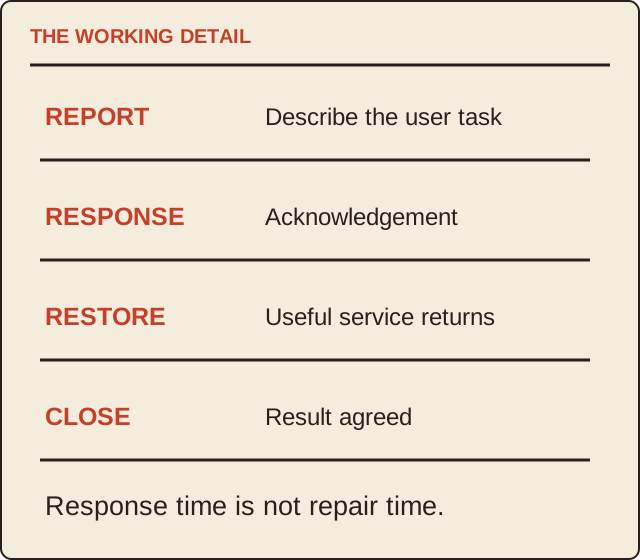
Read the map as text
THE WORKING DETAIL · REPORT · Describe the user task · RESPONSE · Acknowledgement · RESTORE · Useful service returns · CLOSE · Result agreed · Response time is not repair time.
- Report
- Response
- Dependency
- Closure
Put it into practice
A fictional support request concerns a printer unavailable to three colleagues. The provider acknowledges the report within its response window, but a replacement part is needed. The ticket remains open with an owner and next update time. An acknowledgement is recorded as an acknowledgement, not a completed repair or a demonstrated return to service.
Illustrative example, not a reported client project or test.
Your take-away checklist
Compare IT support by the handover from report to resolution
- □ Report: ____________________
- □ Response: ____________________
- □ Dependency: ____________________
- □ Closure: ____________________
Before you act
No support provider is endorsed or given access here. Actual permissions and security decisions remain with the responsible owner.
A worked record
Use the example to see the decisions, then download a blank record for your own task.
- Report
- Named channel and coverageWho can authorise work?
- Response
- Acknowledgement clockNot automatically repair time
- Dependency
- Part or third partyOwner and update time
- Closure
- User task demonstratedRecord actual result
A quote-comparison question
“Please show how this example would move through your service, including business hours, priority, remote access approval, updates and any extra charge.” The answer is easier to compare than “fast support” or an unexplained SLA acronym.
After the provider changes
Retain the device and service inventory, open issues and authorised access record with the appropriate owner. Arrange the exit through your organisation’s procedures. This page does not prescribe an account-security configuration or authorise access changes.
Sources & context
The earlier topic was published 2021-07-05 under the Maria Baldwin byline. The present procedure, examples and diagrams are new work by MichaelT; they do not attribute a new test or professional assessment to the earlier author.
Source: Common Crawl preservation record ↗
Reconcile a support trial’s incoming work and closing backlog
Use a fixed interval and mutually exclusive states to avoid mistaking a transfer or acknowledgement for resolved work.
Define the trial before counting
Use the same start and end point for opening backlog, new requests and closing states. State what counts as one request and how duplicate tickets, reopened work and out-of-scope items are handled. Use neutral references and do not export real customer data into a public worksheet. A provider’s volume headline does not reveal those definitions.
Make the states reconcile
In the simplified example, opening work plus new requests must equal the mutually exclusive closing states. Count a ticket as resolved, transferred out or still pending only once in that snapshot. Real systems with reopened or merged work need additional defined flows. Response and restoration evidence from the main guide remain separate from this administrative count.
Ask about unresolved work
Review age, ownership and the next action for pending requests through the actual service arrangement. A smaller backlog is not automatically better service if requests were merely reclassified or transferred. Keep quality and demonstrated user-task outcomes alongside volume, rather than converting ticket throughput into invented revenue growth or customer satisfaction.
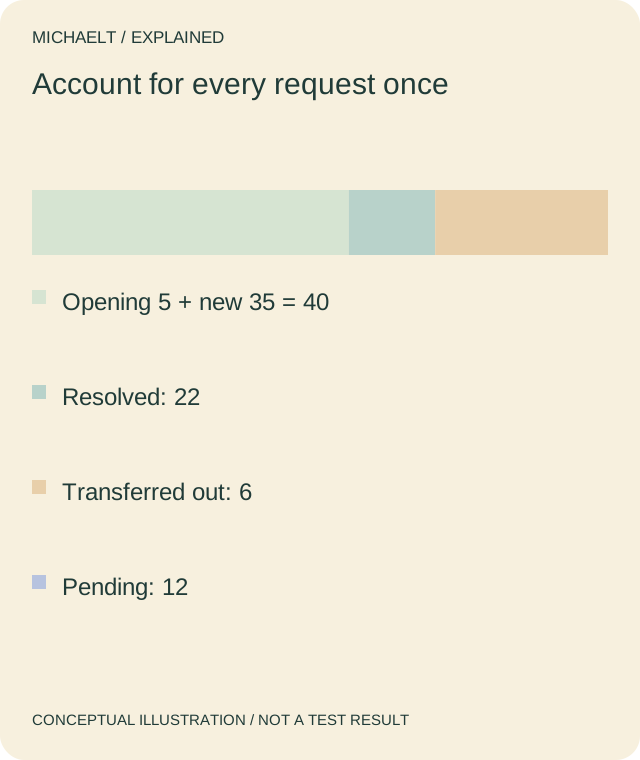
Read the drawing as text
The fictional 40 requests reconcile as 22 resolved, 6 transferred and 12 pending. Transfer is not resolution.
Work through an example
A fictional week opens with 5 requests and receives 35 more: 40 in scope. At the closing snapshot, 22 are resolved, 6 transferred out and 12 pending; 22 + 6 + 12 = 40. The six transfers are not reported as resolved by this provider. The example contains no real service-performance result.
Illustrative example; figures, people and organisations in the worked record are fictional.
The example record
Opening + new
- Count
- 5 + 35 = 40
- Interpretation
- Defined interval
Resolved
- Count
- 22
- Interpretation
- Separate outcome evidence
Transferred out
- Count
- 6
- Interpretation
- Not provider resolution
Closing pending
- Count
- 12
- Interpretation
- 22 + 6 + 12 = 40
Download blank worksheet (.csv) ↗Download worked example (.csv) ↗
Keep your own record
Use the result within its scope
Use the actual service’s definitions and privacy controls. Reconciliation catches accounting ambiguity; it does not prove that a support provider met its commitments.