Follow the task
Define the visible image
Record the image width and aspect ratio you want to compare. Keep width separate from diagonal size and from the full fabric or frame dimensions. Write a unit beside every number so metres and centimetres cannot silently mix.
Measure the proposed optical distance
Record the lens-to-screen distance being considered, not just the overall room length. BenQ defines throw ratio as distance divided by image width. This relation is a geometry check, not proof that a particular projector or mounting place is suitable.
Compare the exact model range
Find the manufacturer’s specification or calculator for that model and lens. Compare its stated range with the calculated requirement, then note unresolved zoom, offset, lens-shift and installation questions. A general label such as short throw does not replace the model’s documentation.
Separate the other constraints
For a simulator, ask the specialist about the full activity space, screen/containment, people, equipment and installation. Do not swing a club or install a mount on the basis of this drawing. Keep image geometry and physical safety as different decisions.
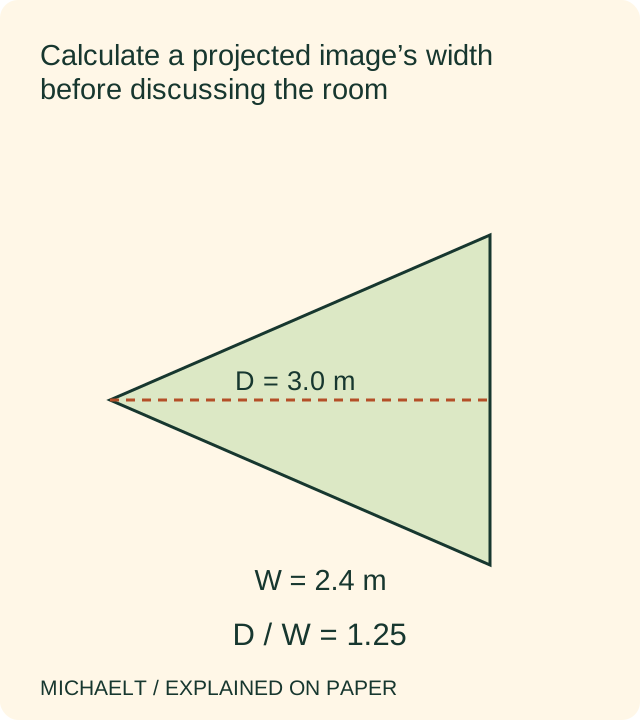
Read the diagram as text
The illustrative distance of 3.0 m divided by 2.4 m image width gives a throw ratio of 1.25.
- Image width/aspect
- 2.4 m image width
- Lens distance
- 3.0 m in the example
- Calculated throw ratio
- 1.25 = 3.0 / 2.4
- Model and separate constraints
- Check exact documentation; safety unresolved
A worked example
An illustrative image is 2.4 m wide and the proposed lens distance is 3.0 m. The required throw ratio is 3.0 ÷ 2.4 = 1.25. A candidate whose documented range does not include that requirement cannot be assumed to produce this geometry. The calculation says nothing about safe swing clearance, image brightness, containment or mounting loads.
Illustrative example, not a reported purchase, client project or product test.
The completed record
- Image width/aspect
- 2.4 m image width
- Lens distance
- 3.0 m in the example
- Calculated throw ratio
- 1.25 = 3.0 / 2.4
- Model and separate constraints
- Check exact documentation; safety unresolved
Download blank record (.csv) ↗Download worked example (.csv) ↗
Your own record
- □ Image width/aspect: ____________________
- □ Lens distance: ____________________
- □ Calculated throw ratio: ____________________
- □ Model and separate constraints: ____________________
Keep the distinction clear
Do not use the screen diagonal as the denominator in this calculation. Do not take a successful picture as an impact-screen test. The earlier article’s broad promises about recreating a golf course are not useful evidence for a particular room. A completed record should identify what the geometry supports and what still needs a qualified answer.
Where this guide stops
Geometry illustration only; not a golf training, projector mounting, laser/eye-safety or simulator containment specification.
Continue with a related task
Sources and original context
The earlier topic was published 2021-07-20 under the Maria Baldwin byline. The present procedure and illustrative record are by MichaelT editorial.