Name the authorised owner and the purpose
Identify the service owner, the person authorised to approve the assessment and the question the assessment must answer. Use an inventory of explicitly named systems and environments. Ownership of one website does not automatically authorise access to a supplier’s platform or another customer’s data. The GOV.UK Service Manual specifically calls for agreement with security and legal teams and consideration of third-party permissions.
Draw an inclusion boundary
Record systems in scope and systems outside it, the approved period, permitted assessment categories and any prohibited actions. An address range or service label should be unambiguous to both parties. Keep actual infrastructure details in a restricted brief, not this public example. Unknown ownership or permission remains an exclusion until resolved. This planning exercise neither starts a scan nor supplies attack instructions.
Agree the stop and contact route
State who can pause the work, how the assessor reaches that person and what acknowledgement is expected. Discuss disruption and data handling before work starts. Do not disable security controls merely to make an illustrative worksheet look complete. Any operational change needs its own appropriate authorisation. A managed monitoring subscription is a different service: ask who detects, who decides and who responds during the actual coverage hours.
Specify the report and the retest
Ask for a report that distinguishes what was examined, what was found, the limits and the evidence required for remediation. Decide who receives the sensitive report and where it is retained. Record each finding’s owner and the agreed verification route. Fixing a configuration and retesting the affected case are separate events; neither a purchase nor a clean summary proves that every weakness has disappeared.
Read the drawing as text
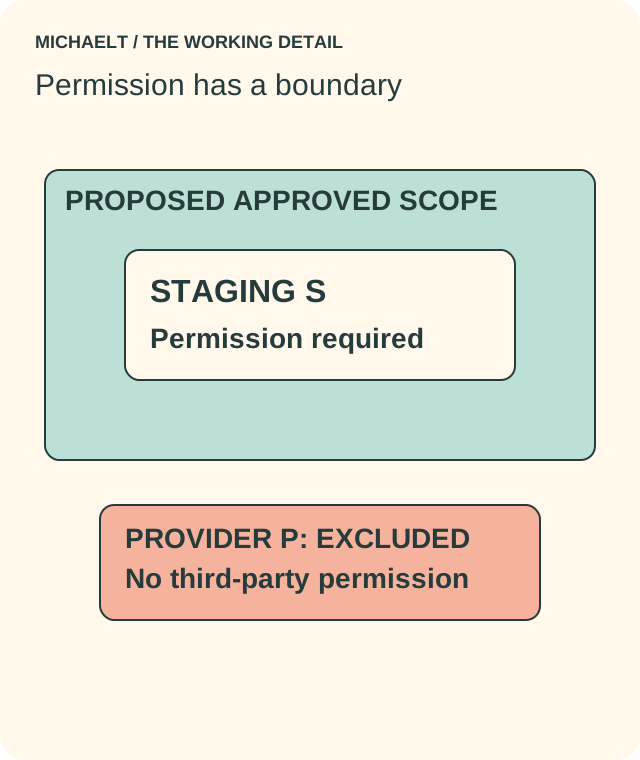
Staging system S is inside the proposed approved scope. External provider P is outside it. A stop contact, restricted report and separate retest must be agreed.
Work through an example
A fictional studio commissions review of its staging application S. Its external payment provider P is excluded because permission has not been obtained. The brief names an approval contact and stop route, requires a restricted report, and leaves the retest result blank. No live system is tested for this example.
Illustrative example; figures, people and organisations in the worked record are fictional.
The example record
Staging S
- Permission state
- Owner approval required
- Result expected
- Agreed assessment report
Provider P
- Permission state
- Excluded: no permission
- Result expected
- No testing
Disruption
- Permission state
- Named stop contact
- Result expected
- Acknowledged pause
Remediation
- Permission state
- Finding owner + retest scope
- Result expected
- Observed result, not a promise
Download blank worksheet (.csv) ↗Download worked example (.csv) ↗
Keep your own record
Use the result within its scope
Keep the commissioning record and technical report separate. The public worksheet helps frame a responsible enquiry; the actual permission, technical method, legal review and incident arrangements belong with qualified people handling the specific service.
Reference sources
Earlier articles on this subject
- All About The Ethical Hacking ↗ — 2022-05-02, Maria Baldwin.
- Know More About Managed Security Services ↗ — 2020-12-18, Maria Baldwin.
- Enhance Your Security with Security Consulting Services in Springfield ↗ — 2022-02-21, Maria Baldwin.